When you click "send" on an email, what happens in the next half-second is more complex than most people realize.
I've spent 27 years watching this process evolve—from the early days when you could trace an email's path with a few SMTP logs to today's multi-layered infrastructure where a single message might pass through a dozen systems before reaching an inbox.
Most senders never think about this journey. They see an API response ("accepted") and assume the hard work is done. But understanding what happens in those 500 milliseconds between your API call and the receiving server's decision is crucial for anyone serious about deliverability.
Let me walk you through it.
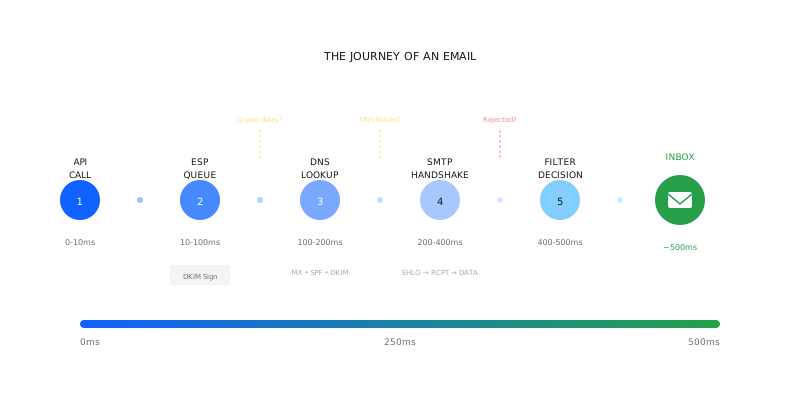
Stage 1: The API Call (0-10ms)
Your application calls the ESP's API. JSON payload, authentication header, recipient address, content.
What happens on the ESP side:
Request validation. Is the API key valid? Is the sending domain verified? Is the recipient address properly formatted? Any failure here returns an immediate error—you'll see it in your logs.
Rate limiting checks. Are you within your plan's limits? Are you hitting the API faster than allowed? ESPs impose rate limits to protect their infrastructure. Exceed them and you'll get throttled or rejected.
Content inspection. Some ESPs run basic content filters at the API layer. Known spam phrases, suspicious URLs, malformed HTML. If flagged, the message might be rejected or queued for manual review.
If everything passes, you get a response: "accepted" or "queued." But "accepted" just means the ESP has taken responsibility for attempting delivery. It doesn't mean delivery has happened.
Stage 2: The ESP's Queue (10-100ms)
Your message enters the ESP's sending infrastructure. Here's where things get interesting.
Message preparation. The ESP adds headers, wraps tracking pixels, rewrites links for click tracking, applies any template rendering. This is also where DKIM signing happens—the cryptographic signature that proves the message wasn't tampered with.
Routing decisions. Which sending IP will this use? Which server? ESPs make complex routing decisions based on recipient domain, sender reputation, current load, and IP warmup status. A single ESP might operate hundreds of sending IPs, each with different reputation profiles.
Queue prioritization. Not all messages send immediately. ESPs balance volume across their infrastructure. Your message might wait behind other messages, especially during peak hours. Some ESPs prioritize transactional over promotional. Some throttle based on recipient domain.
At this stage, things can go wrong invisibly. A misconfigured DKIM key means the signature will fail verification later—but the ESP won't know that yet. Wrong IP selection might mean your message goes from a low-reputation source. Queue delays might mean your time-sensitive message arrives late.
Stage 3: The DNS Dance (100-200ms)
Before the ESP can deliver to Gmail or Outlook, it needs to know where to send the message. This means DNS lookups.
MX record lookup. Where does @gmail.com receive mail? The MX (Mail Exchanger) records point to Google's mail servers. This lookup is usually cached, but cache misses add latency.
IP resolution. The MX record points to a hostname (like gmail-smtp-in.l.google.com), which needs to resolve to an IP address.
SPF lookup. The receiving server will check the sender's SPF record to verify the sending IP is authorized. Complex SPF records with multiple includes can slow this down.
DKIM key lookup. The receiving server will fetch the sender's public DKIM key to verify the signature. If your key isn't published correctly, or DNS is slow, this can cause issues.
DNS is usually fast (sub-20ms), but DNS failures are remarkably common and cause delivery failures that look mysterious from the sender's perspective. "Everything looks fine on our end" is often a DNS problem.
Stage 4: The SMTP Conversation (200-400ms)
Now the actual delivery begins. The ESP opens a TCP connection to the recipient's mail server and starts the SMTP handshake.
EHLO/HELO. The sending server introduces itself. "Hi, I'm mail.sendgrid.net." The receiving server responds with capabilities.
MAIL FROM. The sending server specifies the envelope sender—the address that receives bounces. This is where some reputation checks begin.
RCPT TO. The sending server specifies the recipient. The receiving server may validate the address exists. Some servers reject unknown recipients here. Others accept everything and filter later.
DATA. The actual message content is transmitted. Headers, body, attachments—all of it.
Response. The receiving server returns a code:
- 250: Accepted. Good news.
- 421/450: Deferred. Try again later.
- 550/5xx: Rejected. Hard failure.
Each of these steps generates telemetry that a good monitoring system captures. Most senders only see the final result, not the conversation that led to it.
Stage 5: The Receiving Server's Decision (400-500ms)
Your message is in Gmail's infrastructure now. But "accepted" doesn't mean "inbox."
Spam filtering. Google runs your message through multiple filter layers. Content analysis, sender reputation, authentication verification, user engagement history. This happens in milliseconds, powered by machine learning models trained on billions of messages.
Categorization. Is this Primary, Promotions, Social, Updates? Gmail makes a judgment based on content signals and past user behavior with similar senders.
Final placement. Inbox, spam folder, or—increasingly—silent rejection. Google may accept a message at the SMTP layer and then drop it during processing. You'll never know unless you're watching engagement metrics closely.
By the time the receiving server finishes processing, 500 milliseconds have elapsed. Half a second. Hundreds of decisions made. Dozens of potential failure points passed.
Where Things Go Wrong
Now that you understand the journey, let me highlight where problems actually occur:
ESP queue delays. During high-volume periods, your "urgent" transactional email might queue behind promotional blasts. Some ESPs give you control over priority. Many don't.
DNS propagation issues. Changed your DKIM key? Updated your SPF? DNS changes take time to propagate. During propagation, some receiving servers see the new record, others see the old one. Authentications fail inconsistently.
IP reputation inheritance. New to an ESP? You're probably on shared IPs. The reputation of those IPs reflects all the senders using them—including the ones with bad practices.
Recipient MTA overload. Gmail and Outlook handle huge volumes, but they're not infinite. During peak periods, they defer messages aggressively. Your ESP's retry logic determines whether those deferrals succeed.
Silent filtering. The most frustrating failures are the ones that look like successes. Message accepted, no bounce, but it never reaches the inbox. Only engagement metrics reveal the truth—days later.
Why Sub-500ms Matters
When we built Engagor, we committed to sub-500ms event latency. Here's why that matters:
Traditional monitoring systems process events in batches. Hourly. Daily. You find out about a problem hours after it started.
Sub-500ms means we capture events as they happen. A spike in deferrals shows up in our system while it's still spiking—not in the next day's report.
This latency isn't just about speed. It's about causality. When you can correlate an engagement drop with a configuration change that happened minutes ago, you can diagnose problems while they're still small. Wait 24 hours, and a dozen other variables have changed.
What This Means for You
Most email senders treat their ESP as a black box. Message goes in, delivery rate comes out. What happens in between is someone else's problem.
That's fine—until something goes wrong. And when it does, understanding the journey helps you ask the right questions:
- Is the problem at the API layer (authentication, validation) or downstream (delivery, filtering)?
- Is it a DNS issue (authentication failures) or a reputation issue (rejections, deferrals)?
- Is it our infrastructure (ESP, IP, domain) or theirs (Gmail is having a bad day)?
Every stage of the 500ms journey generates signals. The question is whether you're capturing them.
Engagor captures signals from every stage of the email journey—from API call to inbox placement—and surfaces insights in real time.